
|
Size: 2893
Comment:
|
← Revision 33 as of 2013-03-08 10:02:25 ⇥
Size: 6583
Comment: converted to 1.6 markup
|
| Deletions are marked like this. | Additions are marked like this. |
| Line 1: | Line 1: |
| = Compute the Source Estimates (mne_make_movie) = '''Applying the Inverse Operator''' This script applies the inverse operator to MEG data and outputs the current estimates. The current estimates are morphed to the [[#averagebrain|average brain]], for [[#grandaverage|grand-averaging]]. The results (*.stc-files) can be [[#visualisation|visualised in mne_analyze]], and [[#stcreadwritesubtract|read into Matlab]] using mne_read_stc_file. You can get infos on your stc-files (e.g. maximum value, relevant for scaling your display) using mne_analyze. The main ingredients are * the inverse operator * the averaged MEG data (fiff-files) * the average cortical surface (see below) There are some [[#exampleestimates|examples of current estimates]] at the bottom. The parameters below are reasonable choices for standard analyses. However, these Wiki pages are not supposed to substitute the [[http://www.nmr.mgh.harvard.edu/meg/manuals/MNE-manual-2.6.pdf|MNE manual]], [[http://imaging.mrc-cbu.cam.ac.uk/meg/MEGpapers|reading papers]], and [[ImagersInterestGroup|discussions]] with more experienced researchers. {{{ |
|
| Line 3: | Line 21: |
| #before running script make sure you've typed: # freesurfer_4.0.1 # mne_setup_2.5 # setenv SUBJECTS_DIR /imaging/ef02/lexpro/subject # setenv SUBJECT 0319 ################ # PARAMETERS: # Input/Output file path: #path='/megdata/cbu/PATH/TO/YOUR/DATA' path='/group/erp/data/caroline.coutout/MEG/data' MRIpath='/group/erp/data/caroline.coutout/MEG/MRIs' linkpath='/imaging/olaf/MEG/GoNoGo/STC' # necessary because of extra dot in "...olaf.hauk..." #condition names as used in file names conds=('lex_go' 'lex_nogo' 'lex_Go-NoGo' 'sem_go' 'sem_nogo' 'sem_Go-NoGo' 'freq_H' 'freq_L' 'freq_L-H') # number of effective averages for mne_make_movie --nave # not needed any more #naves=('100' '100' '100' '100' '120') |
## Your variables datapath='<myMEGdatapath>' # root directory for your MEG data MRIpath='/myMRIdirectory/' # where your MRI subdirectories are outpath='/myoutpath' # path for output files #condition names as used in file names to which inverse operator shall be applied conds=('cond1' 'cond2' 'cond3') # subjects names used for MRI data |
| Line 29: | Line 29: |
| '2' \ '3' \ '4' \ '5' \ '6' \ '7' \ '8' \ # '9' \ # '10' \ # '11' \ # '12' \ # '13' \ # '14' \ # '15' \ # '16' \ # '17' \ # '18' \ # '19' \ # '20' \ # '21' \ # '22' \ |
'Subject1' \ 'Subject2' \ 'Subject3' \ |
| Line 51: | Line 33: |
| # MEG IDs (your directory structure may differ) | |
| Line 53: | Line 35: |
| 'meg10_0047' \ 'meg10_0083' \ 'meg10_0084' \ 'meg10_0085' \ 'meg10_0086' \ 'meg10_0087' \ 'meg10_0088' \ # 'meg10_0091' \ # 'meg10_0094' \ # 'meg10_0096' \ # 'meg10_0098' \ # 'meg10_0101' \ # 'meg10_0101' \ # 'meg10_0102' \ # 'meg10_0104' \ # 'meg10_0106' \ # 'meg10_0108' \ # 'meg10_0109' \ # 'meg10_0110' \ # 'meg10_0112' \ # 'meg10_0114' \ ) |
'meg10_0001' \ 'meg10_0002' \ 'meg10_0003' \ ) # MEG subdirectories (your directory structure may differ) |
| Line 77: | Line 41: |
| '100317' \ '100407' \ '100408' \ '100409' \ '100409' \ '100412' \ '100412' \ # '100413' \ # '100414' \ # '100415' \ # '100415' \ # '100416' \ # '100416' \ # '100419' \ # '100419' \ # '100420' \ # '100420' \ # '100421' \ # '100422' \ # '100422' \ # '100423' \ ) ##################### # SCRIPT BEGINS HERE: |
'100001' \ '100002' \ '100003' \ ) ## Processing: |
| Line 107: | Line 48: |
| Line 110: | Line 50: |
# REPORT number of files to be processed: |
|
| Line 117: | Line 53: |
| echo " " | |
| Line 120: | Line 55: |
| echo " " echo " " |
|
| Line 123: | Line 56: |
| for c in `seq 0 ${lastcond}` do # Current Estimates mne_make_movie \ --subject Subject${subjects[m]} \ --inv ${path}/${subj_pre[m]}/${subj_dir[m]}/${subj_pre[m]}_1L-fixed-inv.fif \ --meas ${path}/${subj_pre[m]}/${subj_dir[m]}/${conds[c]}.fif \ --set 1 --morph average --smooth 5 \ --bmin -100 --bmax 0 \ --stc ${path}/STC/${subj_pre[m]}_${conds[c]} | tee -a GNG_make-movie.log |
for c in `seq 0 ${lastcond}` do |
| Line 135: | Line 59: |
| # symbolic links necessary because extra dot in "...olaf.hauk..." causes trouble! ln -s ${path}/STC/${subj_pre[m]}_${conds[c]}-lh.stc ${linkpath}/${subj_pre[m]}_${conds[c]}-lh.stc ln -s ${path}/STC/${subj_pre[m]}_${conds[c]}-rh.stc ${linkpath}/${subj_pre[m]}_${conds[c]}-rh.stc done # condition loop |
# Current Estimates mne_make_movie \ --subject ${subjects[m]} \ --inv ${datapath}/${subj_pre[m]}/${subj_dir[m]}/YourName_1L-MEG-loose0.2-inv.fif \ --meas ${datapath}/${subj_pre[m]}/${subj_dir[m]}/${conds[c]}.fif \ --morph average \ --smooth 5 \ --bmin -100 \ --bmax 0 \ --stc ${outpath}/${subj_pre[m]}_${conds[c]} |
| Line 143: | Line 70: |
| done # subject loop | done # conditions done # subjects }}} The --morph option produces source estimates morphed to the average brain (necessary for grand-averaging). If you don't use it, source estimates will be computed on individual cortical surfaces. Some degree of smoothing (--smooth) is necessary for display. The baseline definition (--bmin/bmax) can be omitted if input data are already appropriately baseline-corrected. Note that this option will not baseline-correct the source estimates. A few CBSU users have experienced an issue with mne_make_movie. It sometimes misses some output that it is supposed to produce. It is important for you to check whether the number of output stc files matches what you expect. Re-running the script again usually solves the problem. <<Anchor(averagebrain)>> = Computing the Average Cortical Surface = {{{ #!/bin/sh # make_average_subject --subjects Subject1 Subject2 Subject3 }}} "Subject1, Subject2..." etc. are the MRI sub-directories created by Freesurfer. The paths to these sub-directories have to be specified in the environment variables, e.g. "setenv SUBJECTS_DIR /MyMriDirectory/". Use "--force" to overwrite an existing average brain, "--out" to use an output name other than the default "average". |
| Line 146: | Line 94: |
| echo " " echo "DONE" echo " " |
<<Anchor(visualisation)>> |
| Line 150: | Line 96: |
| # END OF SCRIPT ###################### |
= Visualising STC-files = You can load STC files into mne_analyze and visualise them interactively (File -> Manage Overlays -> Load stc). You also need to load the brain surface used to compute the source estimates (e.g. the average across subjects, if this was used to morph the single subject results). You can also produce JPG files or movies using mne_make_movie. Here is an example on how to do it: {{{ mne_make_movie \ --subject average \ --smooth 5 \ --stcin infile.stc \ --tmin 0 \ --tmax 400 \ --tstep 10 \ --pickrange \ --noscalebar \ --nocomments \ --jpg outfile.jpg \ --fthresh 0 --fmid 0.0666 --fmax 0.1 }}} <<Anchor(grandaverage)>> = Grand-averaging STC-files = For grand-averaging, STC-files should have been created using the --morph option in mne_make_movie (see above). You can then average them using the command {{{ mne_average_estimates --desc <descriptionfile.txt> }}} where descriptionfile.txt is of the form {{{ stc /yourpath/filetoaverage1.stc stc /yourpath/filetoaverage2.stc stc /yourpath/filetoaverage3.stc deststc <youroutputfile> }}} You can create description files for every average you want to compute, and execute them in one script {{{ #!/bin/sh # mne_average_estimates --desc <descriptionfile1.txt> mne_average_estimates --desc <descriptionfile2.txt> mne_average_estimates --desc <descriptionfile3.txt> }}} <<Anchor(stcreadwritesubtract)>> == Reading, Writing, Subtracting STC-files == This simple Matlab script demonstrates how to read and manipulate STC-files. {{{ data1 = mne_read_stc_file( STCfile1 ); % read STC-file 1 data2 = mne_read_stc_file( STCfile2 ); % read STC-file 2 data3 = data2; % data3 will contain subtracted data, but keep other information from STC-file 2 data3.data = data2.data - data1.data; % subtract STC-file 1 from STC-file 2 mne_write_stc_file( STCfile_out, data3 ); % Write subtracted data to STC-file }}} <<Anchor(exampleestimates)>> == Examples of Current Estimates == {{attachment:MNE_Estimates.jpg}} These figures show MNE current estimates for a visually evoked brain response around 170 ms for a single participant. The left presents the unsigned (intensity), the right the signed version of the estimate. Note that the intensity version ignores the cirection of current flow on the cortical surface. In the signed version, the "speckled" pattern of positive and negative values most likely results from the fact that blurring of sources results in reversed directions of current flow on opposing walls of sulci. |
Compute the Source Estimates (mne_make_movie)
Applying the Inverse Operator
This script applies the inverse operator to MEG data and outputs the current estimates. The current estimates are morphed to the average brain, for grand-averaging. The results (*.stc-files) can be visualised in mne_analyze, and read into Matlab using mne_read_stc_file. You can get infos on your stc-files (e.g. maximum value, relevant for scaling your display) using mne_analyze.
The main ingredients are
* the inverse operator
* the averaged MEG data (fiff-files)
* the average cortical surface (see below)
There are some examples of current estimates at the bottom.
The parameters below are reasonable choices for standard analyses. However, these Wiki pages are not supposed to substitute the MNE manual, reading papers, and discussions with more experienced researchers.
#
## Your variables
datapath='<myMEGdatapath>'    # root directory for your MEG data
MRIpath='/myMRIdirectory/'    # where your MRI subdirectories are
outpath='/myoutpath'  # path for output files
#condition names as used in file names to which inverse operator shall be applied
conds=('cond1' 'cond2' 'cond3')
# subjects names used for MRI data
subjects=(\
        'Subject1' \
        'Subject2' \
        'Subject3' \
)
# MEG IDs (your directory structure may differ)
subj_pre=(\
        'meg10_0001' \
        'meg10_0002' \
        'meg10_0003' \
        )
# MEG subdirectories (your directory structure may differ)
subj_dir=(\
         '100001' \
         '100002' \
         '100003' \
        )
## Processing:
nsubjects=${#subjects[*]}
lastsubj=`expr $nsubjects - 1`
nconds=${#conds[*]}
lastcond=`expr $nconds - 1`
for m in `seq 0 ${lastsubj}`
do
  echo " "
  echo " Computing movies  for SUBJECT  ${subjects[m]}"
  echo " "

        for c in `seq 0 ${lastcond}`
        do

                # Current Estimates
                mne_make_movie \
                --subject ${subjects[m]} \
                --inv ${datapath}/${subj_pre[m]}/${subj_dir[m]}/YourName_1L-MEG-loose0.2-inv.fif \
                --meas ${datapath}/${subj_pre[m]}/${subj_dir[m]}/${conds[c]}.fif \
                --morph average \
                --smooth 5 \
                --bmin -100 \
                --bmax 0 \
                --stc ${outpath}/${subj_pre[m]}_${conds[c]}

        done # conditions
done # subjects
The --morph option produces source estimates morphed to the average brain (necessary for grand-averaging). If you don't use it, source estimates will be computed on individual cortical surfaces.
Some degree of smoothing (--smooth) is necessary for display.
The baseline definition (--bmin/bmax) can be omitted if input data are already appropriately baseline-corrected. Note that this option will not baseline-correct the source estimates.
A few CBSU users have experienced an issue with mne_make_movie. It sometimes misses some output that it is supposed to produce. It is important for you to check whether the number of output stc files matches what you expect. Re-running the script again usually solves the problem.
Computing the Average Cortical Surface
#
make_average_subject --subjects   Subject1 Subject2 Subject3
"Subject1, Subject2..." etc. are the MRI sub-directories created by Freesurfer. The paths to these sub-directories have to be specified in the environment variables, e.g. "setenv SUBJECTS_DIR /MyMriDirectory/".
Use "--force" to overwrite an existing average brain, "--out" to use an output name other than the default "average".
Visualising STC-files
You can load STC files into mne_analyze and visualise them interactively (File -> Manage Overlays -> Load stc). You also need to load the brain surface used to compute the source estimates (e.g. the average across subjects, if this was used to morph the single subject results).
You can also produce JPG files or movies using mne_make_movie. Here is an example on how to do it:
mne_make_movie \
    --subject average \
    --smooth 5 \
    --stcin infile.stc \
    --tmin 0 \
    --tmax 400 \
    --tstep 10 \
    --pickrange \
    --noscalebar \
    --nocomments \
    --jpg outfile.jpg \
    --fthresh 0  --fmid 0.0666  --fmax 0.1
Grand-averaging STC-files
For grand-averaging, STC-files should have been created using the --morph option in mne_make_movie (see above). You can then average them using the command
mne_average_estimates --desc <descriptionfile.txt>
where descriptionfile.txt is of the form
stc /yourpath/filetoaverage1.stc
stc /yourpath/filetoaverage2.stc
stc /yourpath/filetoaverage3.stc
deststc <youroutputfile>
You can create description files for every average you want to compute, and execute them in one script
#
mne_average_estimates --desc <descriptionfile1.txt>
mne_average_estimates --desc <descriptionfile2.txt>
mne_average_estimates --desc <descriptionfile3.txt>
Reading, Writing, Subtracting STC-files
This simple Matlab script demonstrates how to read and manipulate STC-files.
data1 = mne_read_stc_file( STCfile1 );  % read STC-file 1
data2 = mne_read_stc_file( STCfile2 );  % read STC-file 2
data3 = data2;  % data3 will contain subtracted data, but keep other information from STC-file 2
data3.data = data2.data - data1.data; % subtract STC-file 1 from STC-file 2
mne_write_stc_file( STCfile_out, data3 );  % Write subtracted data to STC-file
Examples of Current Estimates
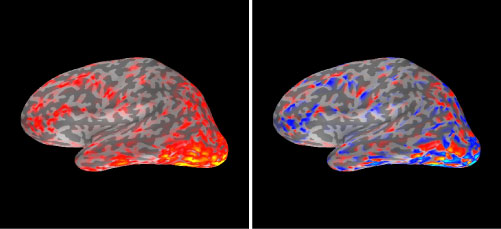
These figures show MNE current estimates for a visually evoked brain response around 170 ms for a single participant. The left presents the unsigned (intensity), the right the signed version of the estimate. Note that the intensity version ignores the cirection of current flow on the cortical surface. In the signed version, the "speckled" pattern of positive and negative values most likely results from the fact that blurring of sources results in reversed directions of current flow on opposing walls of sulci.